Partner onboarding
Before you can onboard merchants, dpay configures your partner account. This section explains what you receive and how authentication works.
What you receive from dpay
| Item | Description |
|---|---|
API key (dp_live_... or dp_test_...) | A single platform key: dp_live_ in production, dp_test_ for a sandbox account. It authenticates all partner API calls and is shown once when generated. |
| Scopes | The key's permission set (see below). |
| Channel | The identifier of your onboarding channel. It links every merchant account to you and determines the agreement template and rates. |
| Webhook secrets | Every endpoint you add in the partner portal (Webhooks tab) has its own whsec_... secret used to verify the signature of webhooks. |
Store the key securely, such as in a secrets manager or environment variable. dpay stores only its hash and a preview (dp_live_…AbCd). If you lose the key, regenerate it in the partner portal - the old key stops working immediately. The key is 44 characters long and ends with a checksum, so a typo is rejected right away and secret scanners (such as GitHub Secret Scanning) recognise it in code.
Authenticating API calls
Send every partner API call with this header:
Authorization: Bearer dp_live_your_platform_key
Partner API base URL:
https://panel.dpay.pl/api/partner/v1
The exception is on-behalf payment registration, which uses the standard registration endpoint on the payments domain (https://api-payments.dpay.pl).
Scopes
Each key has assigned scopes. A call outside the key's scope receives a 403 response.
| Scope | Allows you to |
|---|---|
onboarding:read | Read the onboarding status of your merchants. |
onboarding:write | Create and complete onboarding flows (draft, segments, and finalize). |
account:read | Read a merchant account on behalf of the merchant (transactions, settlements, balance, and account frame). |
payments:write | Register payments on the merchant's behalf. |
payouts:write | Request payouts on the merchant's behalf. |
A scope on the key is necessary but not sufficient. On-behalf actions also require merchant consent (delegation) covering the relevant permission. The payouts:write scope alone is not enough if the merchant has not opted in to payouts. See the section below.
Onboarding channel
Your channel (for example, fakturka) is how dpay identifies that an account belongs to you. The channel determines:
- the agreement template signed by the merchant,
- the rates (MDR) that apply to merchants in your channel,
- the account assignment to your partner account (the captive model).
For iframe onboarding, pass the channel in the ch option. For API and redirect onboarding, the channel is derived from your key. If your key has multiple channels, specify one in the channel field.
Merchant consent mechanism (delegation)
To act on a merchant's behalf, you need the merchant's explicit consent. Consent has two levels, and the merchant confirms each one with an SMS code (the only OTP channel):
- Account access + payments - granted automatically when the merchant signs your channel agreement during onboarding using an SMS code. There is no separate "request consent" API call. Delegation is part of the channel agreement, and the signature strongly authenticates the authorised person.
- Payouts - require a separate, explicit merchant opt-in in the account frame, also confirmed by SMS code. Payout permission is never implied by the agreement alone.
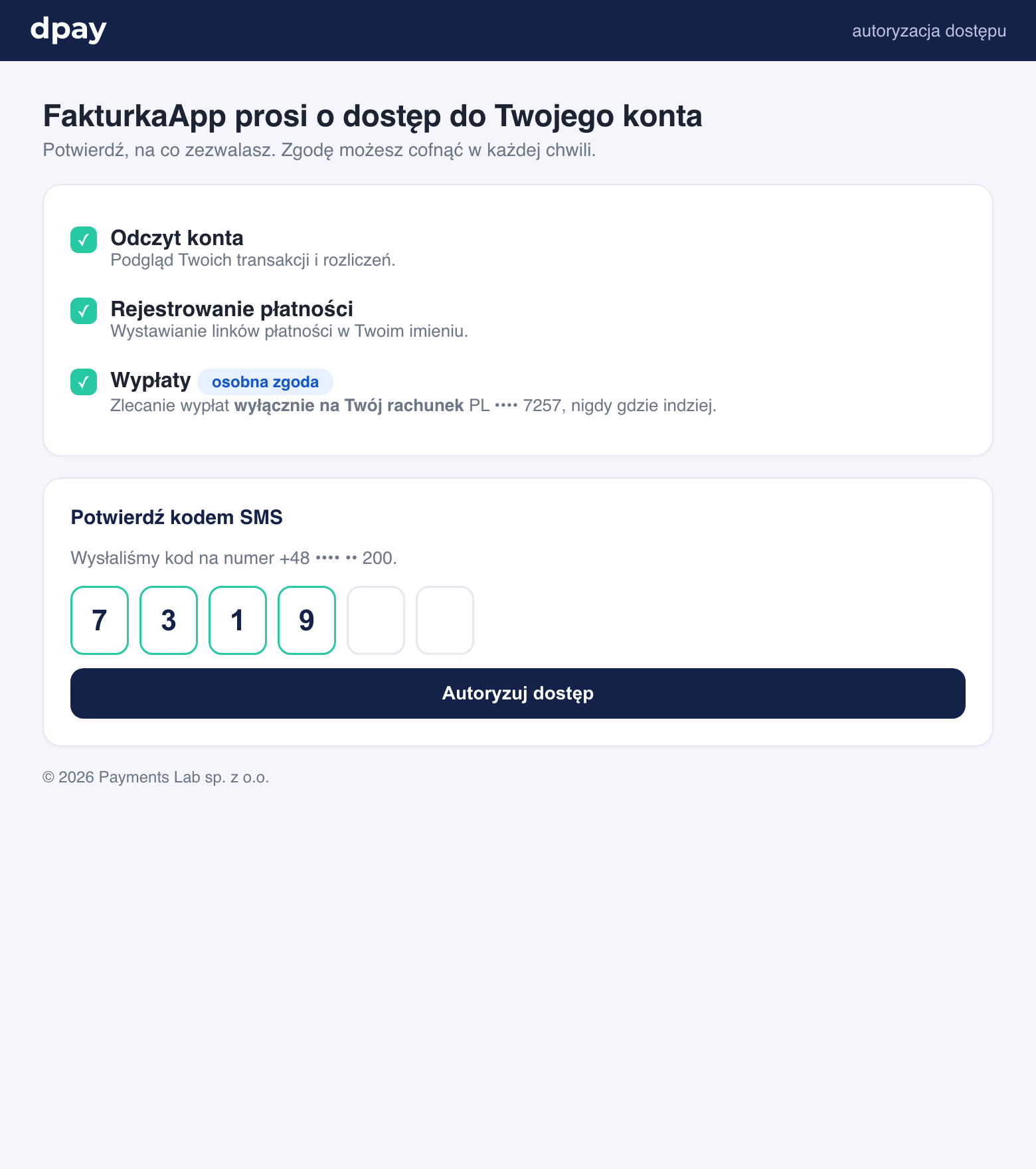
How delegation works
Delegation rules
- Payouts require separate consent. Even if the merchant has signed the agreement (account access + payments), payouts (
payouts:write) require a separate, explicit opt-in in the account frame with its own SMS code. - Payouts always go to the merchant's account. Payout consent does not let you specify an arbitrary account. dpay pays only to the merchant's verified bank account and always pays the entire available balance.
- Revocation is immediate and complete. The merchant revokes access in the account frame using an SMS code. Revocation covers all permissions at once. From that point, on-behalf calls return
403(fail closed), and you receive anauthorization.revokedwebhook.
Next step
Choose how you want to onboard merchants:
- Iframe onboarding - a ready-made dpay widget embedded in your product.
- Redirect onboarding - a dpay-hosted flow.
- API onboarding - a headless flow with your own UI.